
Introduction
Ever dropped a custom character into Source Filmmaker(SFM Compile) and watched it vanish, or turn into a purple-and-black checkerboard? That usually points to one missing step: compilation.
This beginner-friendly guide from Lingramo explains what SFM compile is, which tools make it work, and how the process runs from raw mesh to a working model. It also covers common errors, animation basics, downloads, and video editing, so new creators can build a clean workflow in 2026 without guesswork.
Quick Answer
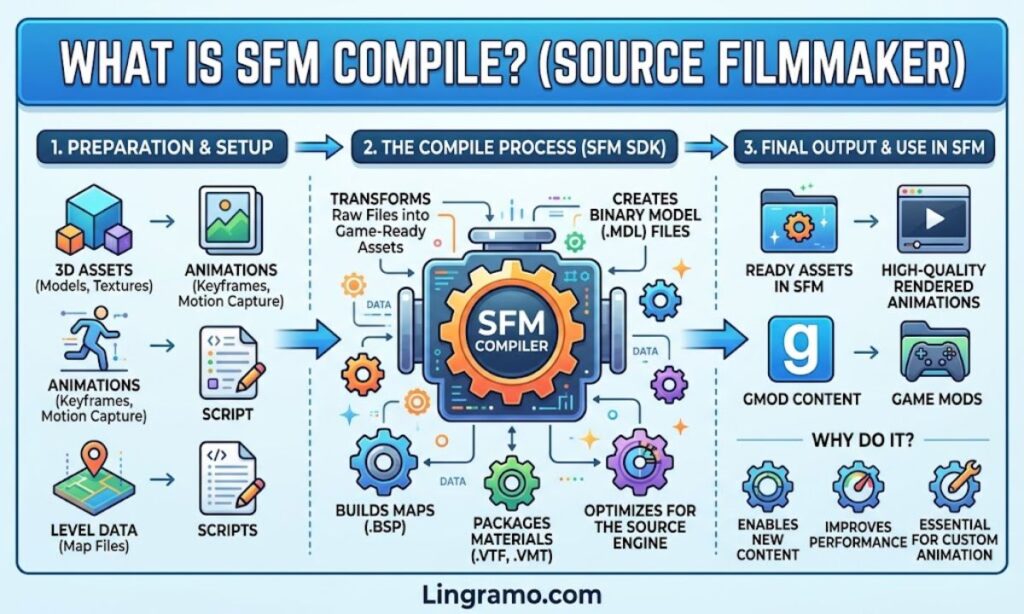
SFM compile is the process of converting a prepared 3D model, its textures, and its animation data into Source engine files that Source Filmmaker can load. The output usually includes MDL, VVD, VTX, and PHY files. StudioMDL does the actual work, Crowbar offers a friendly window for it, and a QC script tells the compiler how to assemble everything.
Looking for more inspiration? Explore our complete “Playing Games on Blog PlayBattleSquare for Every Gamer” collection for even more fun, creative, and unique ideas.
Table of Contents
- Understanding SFM Compile
- Vital Software for SFM Compile
- SFM Compile Process Steps
- SFM Compile at a Glance
- What Are the Right Practices for SFM Compile?
- Common Errors of SFM Compile
- SFM Tools Guide
- SFM Model Guide
- SFM Animation Basics
- SFM Mobile Version
- SFM School Program
- SFM Download Options
- SFM 3D Assets
- SFM Video Editing
- Sophisticated SFM Compile Techniques
- SFM Compile Workflow for Beginners: Where to Start?
- Examples
- Conclusion
- FAQs
Understanding SFM Compile
Source Filmmaker does not open .blend, .fbx, or .obj files directly. It reads models built for Valve’s Source engine. SFM compile is the bridge between the two.
A compiled model is a small bundle, not a single file. The .mdl file holds the main structure. The .vvd file stores vertex data, the .vtx file handles rendering data, and the .phy file carries collision information.
If one piece goes missing, the model may load without physics, or not load at all.
The job is handled by StudioMDL, Valve’s command-line model compiler. Most beginners reach it through Crowbar, a graphical wrapper that hides the scary parts.
Think of it as translation. The artist speaks Blender, the engine speaks Source, and the compiler sits in the middle as the interpreter.
Example: A Coffee Mug Prop
A creator builds a mug in Blender and exports it as an SMD file. Next comes a short QC script. After compiling, the mug appears in SFM’s model browser like any built-in prop.
Vital Software for SFM Compile
A handful of free tools cover almost every beginner workflow.
| Tool | Purpose | Beginner Friendly? |
| Blender + Source Tools plugin | Modeling, rigging, and SMD/DMX export | Yes |
| Crowbar | Graphical compiler and decompiler | Yes |
| StudioMDL | Valve’s command-line compiler | Moderate |
| VTFEdit | Converts images to VTF and edits VMT materials | Yes |
| Half-Life Model Viewer (HLMV) | Previews compiled models | Yes |
| Notepad++ | Edits QC scripts | Yes |
| Source Filmmaker | Final animation environment | Yes |
Crowbar is the usual starting point. It removes the need to memorize compiler flags on day one.
One setup detail trips up many newcomers. Crowbar looks for SFM in a default location. When SFM lives on another drive, the compiler path must be set manually.
Also, use SFM’s own StudioMDL where possible. It is tuned for SFM models, and it allows higher limits than compilers bundled with some other games.
SFM Compile Process Steps
Every SFM compile follows roughly the same sequence.
- Build the model. Create the mesh, rig it with bones, and paint weights.
- Export. Save reference meshes and animations as SMD or DMX files.
- Prepare materials. Convert textures to VTF and write matching VMT files.
- Write the QC file. This plain-text script describes the model.
- Organize folders. Keep paths short, with no spaces or special characters.
- Run the compiler. Load the QC in Crowbar and click Compile.
- Check the output. Confirm the MDL, VVD, VTX, and PHY files exist.
- Test. Open the model in HLMV, then in SFM.
Example: A Minimal QC File
$modelname “props/mug.mdl”
$body mug “mug.smd”
$cdmaterials “models/props/”
$surfaceprop “default”
$staticprop
$sequence idle “mug.smd”
$collisionmodel “mug_phys.smd” { $concave $mass 1 }
Each line answers a question. What is the model called? Which mesh does it use? Where do the materials live? Which animation plays by default?
SFM Compile at a Glance
| Aspect | Detail |
| Input files | SMD or DMX meshes, QC script, VTF and VMT materials |
| Output files | MDL, VVD, VTX, PHY |
| Main compiler | StudioMDL |
| Friendly alternative | Crowbar |
| Preview tool | Half-Life Model Viewer |
| Platform | Windows |
| Software cost | SFM is free on Steam |
| Top failure point | Wrong file paths in the QC or VMT |
What Are the Right Practices for SFM Compile?
Good habits prevent most compile headaches. Lingramo’s beginner advice comes down to a few repeatable rules.
- Keep folder paths short, with no spaces or unusual characters.
- Match capitalization exactly between the QC file and the folders.
- Compile a simple prop before attempting a full character.
- Read the entire compiler log, not just the last line.
- Keep a backup of the last QC file that worked.
- Remove unused materials from the 3D scene before exporting.
- Keep polygon counts reasonable. Many guides suggest staying under roughly 60,000 triangles for a single character.
- Test in HLMV first, because it isolates model problems from scene problems.
Example: The One-Change Rule
A creator adds a new bodygroup, a new skin, and a physics mesh in one go. The compile fails. Undoing everything is painful.
Changing one thing per compile would have pointed straight at the culprit.
Common Errors of SFM Compile
Most failures trace back to a path, a limit, or a missing file.
Looking for more inspiration? Explore our complete “Onb Mean” collection for even more fun, creative, and unique ideas.
| Error or Symptom | Likely Cause | Typical Fix |
| Purple-and-black checkerboard | Broken material path in the QC or VMT | Check $cdmaterials and confirm textures sit in that folder |
| “Error opening file” | QC points to a missing SMD or texture | Recheck spelling, capitalization, and folders |
| Model invisible in HLMV | Animation exported instead of a reference mesh | Re-export the reference mesh |
| “Too many materials” | Model exceeds the material limit (commonly 32) | Merge materials and clean unused ones |
| “Too many flex controllers” | Facial flexes exceed the limit (commonly 128) | Trim controllers or use SFM’s compiler |
| EXCEPTION_ACCESS_VIOLATION | Mismatched or corrupt flex data, or an overly dense mesh | Re-export, simplify, or rewrite the QC |
| Compiler not found | SFM installed in a non-default location | Set the game path manually in Crowbar |
A compile that reports success can still produce a broken model. Missing companion files or wrong folders may leave it textureless or motionless.
Example: Fixing the Checkerboard
The mug loads, but it looks like a purple-and-black grid. The $cdmaterials line says models/props/, yet the VMT sits in models/prop/. One missing letter causes the whole problem.
SFM Tools Guide
SFM compile is one part of a wider toolkit.
- Source Filmmaker: The main environment for posing, animating, and rendering.
- Crowbar: Compiles models, and can decompile existing ones for study when the creator’s permissions allow it.
- VTFEdit: Handles texture conversion and material files.
- HLMV: Offers a quick preview with bone, mesh, and material checks.
- Blender Source Tools: Bridges Blender and Source formats.
One warning helps here. Source 2 Filmmaker is a different program built for Valve’s newer engine, and its pipeline differs from the classic tool. Skills transfer in spirit, but not file for file.
SFM Model Guide
A dependable model has five parts working together.
- Reference mesh: The visible geometry.
- Skeleton: Bones that drive movement.
- Weights: How strongly each bone moves each vertex.
- Materials: VTF and VMT files that control appearance.
- Physics mesh: A simplified shape for collisions.
Clean UV unwrapping matters more than most beginners expect. So does clear bone naming.
Characters may also carry flexes, which are facial shape keys used for expressions. These add power, but they also add compile limits and risks.
Example: A Character With Expressions
A creator rigs a character with twenty face shapes. Keeping every flex on one head object avoids naming conflicts and reduces compile trouble.
SFM Animation Basics
Once a model works, animation begins. SFM’s main workspaces include a timeline, an animation set editor for posing, and a graph editor for refining motion curves.
A simple loop helps beginners:
- Place the camera first.
- Block out key poses.
- Add in-between poses.
- Smooth motion in the graph editor.
- Light the scene, then render a test.
Small motions sell realism. A slight head turn before a step, or a delayed hand, often beats a dramatic pose.
Example: A Three-Second Wave
The creator poses the arm down, up, and mid-wave on three keyframes. Then the curves get smoothed so the hand eases in and out.
SFM Mobile Version
SFM has no official mobile version. It is a Windows desktop program built on the Source engine, distributed through Steam.
Apps advertised as “SFM for Android” or iOS deserve suspicion. They are not Valve products, and some may carry malware.
Phones still help. Creators use them for storyboards, reference photos, and reviewing rendered clips. Remote desktop apps can also control a home PC, though heavy scenes will feel laggy.
Looking for more inspiration? Explore our complete “IHY” collection for even more fun, creative, and unique ideas.
SFM School Program
No official Valve education program for SFM is known. Even so, teachers can use it as a free tool in computer labs, since it costs nothing and runs on modest hardware.
Classroom projects might include short history reenactments, science explainers, or storytelling exercises.
Educators should plan carefully. Steam Workshop content is community-made, and some of it is unsuitable for young audiences. School IT teams may also need to approve Steam installs.
Using a curated, pre-checked set of assets keeps lessons safe.
Example: A Physics Explainer
A teacher assigns groups a 30-second animation on gravity. Students use approved props and record a voiceover.
SFM Download Options
Stick to official and well-known sources.
- Source Filmmaker: Free through Steam.
- Crowbar: Distributed by its developer through GitHub and its community page.
- Blender: Available from Blender’s official site.
- VTFEdit and Notepad++: Available from their project pages.
Avoid re-uploaded installers on random download sites. Modified files are a common way malware spreads.
SFM 3D Assets
Assets fuel every scene. Common sources include the Steam Workshop, community model libraries, and models created from scratch.
Licensing matters. Always read the creator’s terms, give credit where requested, and get permission before decompiling or modifying someone else’s work.
Organization pays off. Separate folders for models, materials, and sounds make compiling far smoother.
Example: A Clean Asset Folder
A creator keeps models, materials, and sound folders side by side. When a texture goes missing, the fix takes seconds.
SFM Video Editing
SFM can render finished clips, but many creators finish in a dedicated editor.
A popular approach is rendering an image sequence plus a separate audio file. This preserves quality, avoids repeated compression, and lets a crashed render resume more easily.
Editors like DaVinci Resolve, Shotcut, or Premiere Pro then handle cuts, color grading, sound design, and subtitles.
Editing is also where pacing gets fixed. A scene that felt slow in SFM often improves after trimming a few frames.
Sophisticated SFM Compile Techniques
Advanced creators go beyond the basics.
- Bodygroups: Swap outfits or accessories inside one model.
- Texture groups: Offer alternate skins.
- LODs: Provide lower-detail versions for distance.
- Jiggle bones: Add secondary motion to hair or cloth.
- Attachments: Define points for props or effects.
- Command-line compiling: Gives raw logs and supports batch work.
A typical command-line compile looks like this, with the path adjusted to the local install:
studiomdl.exe -nop4 -game “D:\Steam\steamapps\common\SourceFilmmaker\game\usermod” mug.qc
Advanced features multiply the places where things can break. Add them one at a time.
SFM Compile Workflow for Beginners: Where to Start?
A gentle path works best.
- Install SFM through Steam.
- Install Crowbar and confirm it finds SFM’s compiler.
- Install Blender with the Source Tools plugin.
- Build a simple cube or mug.
- Write a tiny QC file and compile it.
- Preview in HLMV, then load it in SFM.
- Add textures, then collision, then animation.
Small wins build confidence. Lingramo recommends finishing one simple prop before touching characters.
Examples
Example: Reading a Compile Log
The log ends with “Aborted Processing.” Scrolling up reveals a line naming the exact QC line and the file it could not open. The fix is a typo in a filename.
The lesson is to read the whole log, starting from the first error.
Example: A Five-Minute Texture Fix
A model shows as a checkerboard. The creator opens the VMT, compares its $basetexture path to the folder, and finds a mismatch. After correcting it and recompiling, the texture appears.
Conclusion
SFM compile looks technical, yet it follows a predictable chain: prepare clean assets, write an accurate QC, run the compiler, and test the result. Most problems come from paths, limits, or missing files.
Start small, change one thing at a time, and keep backups. With those habits, SFM compile becomes routine, and the creative work can take center stage. For more beginner-friendly guides, keep exploring Lingramo.
FAQs
What is SFM compile in simple terms?
It is the process of converting 3D model files into Source engine files that Source Filmmaker can read.
Do I need Crowbar to compile?
No. StudioMDL does the compiling, but Crowbar makes it much easier for beginners.
Why is my model purple and black?
The engine cannot find the texture. Check the material path in the QC and VMT files.
Is SFM free?
Yes. Source Filmmaker is free through Steam.
Is there an SFM mobile app?
No official one exists. SFM runs on Windows PCs.
